
FITNESS FOR THE LONG RUN

A stronger you.
A life in balance.

An iPhone fitness app for strength, cycling, running and mobility.
A practical plan for long-term health, built around your life.

Try the free beta Free iPhone beta · 100 testers
How to install on iPhone
Your goals. Your available time. Your pace.
A LITTLE MORE BALANCE
YOUR WEEK, MADE SIMPLE01 — 07
LifeFit.
A little stronger, together.

Cycling week · 2 rides · 2 strength sessions · mobility

FULL-BODY STRENGTH35 min

Workout A

Four foundations. One good session.

01Squat3 × 5
02Bench press3 × 8
03Row3 × 8
04Plank3 × 30–60 sec
Begin with a warm-up. Build with control.
Life comes first.Consistency leaves room for rest.

Illustrative plan preview · select a day to explore

BUILT AROUND YOUR LIFE

Move well.

Build strength.

Keep going.

THE EVERYDAY FOUNDATIONS

Four ways to move.
One place to start.

You don’t need a more complicated routine. You need a plan you can come back to.

01 / STRENGTH

Strength —
Strong foundations

Build full-body strength with simple exercises like squats, presses and rows. Choose Gym or Home, and progress at your own pace.

Squat3 × 5
Bench press3 × 8
Dumbbell or barbell row3 × 8
Plank3 × 30–60 sec

Workout A · free weights and a little floor space.
02 / CYCLING

Cardio — Cycling

Build endurance on the bike, from easy weekday rides to longer weekend outings and your regular group ride.

Regular sessions belong in your plan.

03 / RUNNING

Cardio — Running

Improve your fitness with easy runs and longer sessions, balanced with strength training and recovery.

AN EASY RUN30 min

A comfortable, conversational pace.

One run at a time. Room to recover.

04 / MOBILITY

Mobility —
Move freely

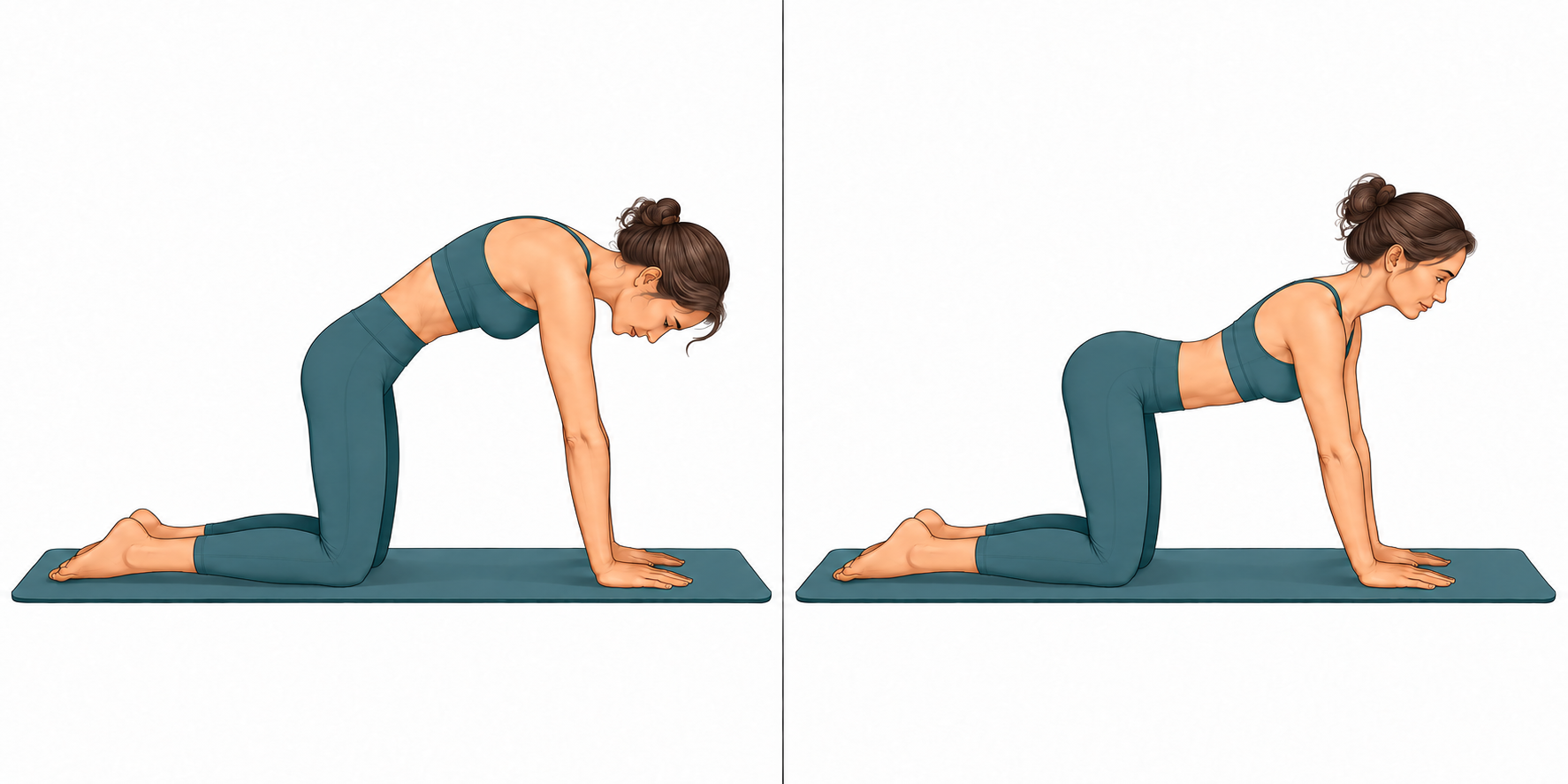
Gentle stretches and controlled movements for your hips, legs, back and shoulders. Follow illustrated 5- and 15-minute guides with no equipment beyond an optional mat or wall.

LifeFit mobility illustration: a woman moves from gently rounding her back to a small chest opening on hands and knees.
Cat–Cow · from the LifeFit movement guide

Run. Ride. Or mix both.

You don’t have to choose between cycling and running. Combine both in your weekly plan, alongside strength and mobility. LifeFit fits your sessions around your goals, available time and recovery.

HEALTH FIRST. FOR THE LONG RUN.

Build fitness for life.
At 40. Before 40. Beyond 40.

LifeFit brings strength, endurance and mobility into one manageable plan, with room to recover and begin again.

01 / A BROADER FOUNDATION

Train more than your cardio.

WHO recommends both aerobic activity and strength work for adults. LifeFit pairs running or cycling with two simple full-body strength sessions, so lifting does not get lost in the week. [1]

02 / MOVEMENT FOR EVERYDAY LIFE

Make space to move well.

Short mobility guides give comfortable movement its own place in your plan. As we grow older, strength and balance also matter: WHO recommends varied activity with functional balance and strength from age 65. Mobility complements these; stretching alone does not replace them. [1]

03 / A RHYTHM YOU CAN RETURN TO

Start where you are.

Choose your available time, adjust sets and resume an unfinished session. Whether you are over 40 or building habits earlier, LifeFit is designed to make health-focused training practical. Forty is not a medical cut-off, and you do not need to wait until then to start.

Why this combination?

In a large observational study, adults meeting both aerobic and muscle-strengthening recommendations had a lower risk of death during follow-up than those meeting neither. That is an association, not proof of cause and effect. [2]

For adults, WHO recommends 2½–5 hours of moderate aerobic activity a week, or 1¼–2½ hours of vigorous activity, or a mix, plus strength work on at least two days. Some activity is better than none; build up gradually. The website’s example weeks illustrate a layout, not a complete weekly activity prescription. [1]

Research supports these training principles. LifeFit itself has not been clinically evaluated or shown to outperform other apps.

MORE ROOM FOR REAL LIFE

A plan that fits.
Even when life doesn’t.

Some weeks are full. Some sessions get cut short. LifeFit helps you keep a rhythm without turning missed training into a debt.

Get to know the app
01

Start with your week.

Choose your goals, experience, available days and weekly time. Review the plan before updating your calendar.

02

Pick up where you left off.

Resume unfinished strength and mobility sessions. Change weights between sets, remove an exercise or finish early.

03

Make room when you need it.

Choose a gentler week or ease back after a break. Record what you did, and take the next sensible step.

RECOVERY & DAILY ACTIVITYOptional
Sleep7 hr 42 minSleep last night
Resting heart rate54 bpmResting heart rate today
HRV48 msHeart rate variability
Steps & exercise time8,420 steps42 min of exercise today

Demo data · illustrative readings, not real health records

A LITTLE CONTEXT. ALWAYS YOUR CHOICE.

Check in.
Then choose your pace.

Connect to Apple Health to review workouts and the recovery categories you select: sleep, resting heart rate, HRV, steps and exercise time.

You can use LifeFit without connecting. Missing readings stay “No data.” Your training history stays on your device.

Read our privacy policy

THE IPHONE BETA IS HERE

Be one of our
first 100 testers.

Try all LifeFit features free during beta. Help us shape a fitness app that fits everyday life.

  1. Open the invite on your iPhone.

    Tap the beta link below. If you are reading this on a computer, open this page on your iPhone first.

  2. Install Apple TestFlight.

    Follow the invitation to get Apple’s free TestFlight app from the App Store. Then return to the invitation link.

  3. Accept and install LifeFit.

    Accept the invitation, tap Install and open LifeFit. Set up your plan and try your first workout.

Install the free iPhone beta

Limited to 100 testers. If the beta is full, you can sign up for the public launch announcement below.

Found a problem or have a suggestion? Send feedback through TestFlight or email kontakt@nordcmo.no. Beta software may contain bugs.

A FEW GOOD QUESTIONS

Keep it simple.

Is LifeFit available on the App Store?

You can try LifeFit now through Apple TestFlight. The beta is free and limited to 100 testers. Follow the installation guide to get started on your iPhone. The public App Store release is still to come.

Do I need Apple Health or an Apple Watch?

No. You can create a plan and log training without either. If you choose to connect, compatible Apple Watch readings can appear through Apple Health. There is no separate LifeFit watch app in this version.

Can I train at home?

Yes. Strength workouts have Gym and Home modes. Some home pulling exercises need suitable, secure equipment; the app explains the available alternatives. Mobility guides need only floor space, an optional mat and a wall for support.

Where is my training information stored?

Your profile, plan, logged workouts and unfinished sessions are stored on your device. You can export a copy or delete your local LifeFit data in the app. Read the privacy policy for details about optional connections and exports.

GOOD THINGS TAKE A LITTLE TIME.

Be there
from the start.

Prefer to wait for the public release, or found the beta full? Leave your email and we’ll let you know when LifeFit launches.

One launch announcement. No training data. No ongoing newsletter.

Used only to let you know when LifeFit launches.

A question before you join? Visit support ↗